|
NEW WM Capture D3D recording
(4K movies and video games captured from your computer
screen)
Download
WM Capture 10v12
----------------------------------------------------------------------------------------------------------------------------------------
From wmrecorder.com
User
feedback: "It's the
simplest and easiest way to record high quality movies and videos from my
computer screen, without the hassle and fuss of other software.
----------------------------------------------------------------------------------------------------------------------------------------
7
reasons WM Capture software is different
1. Includes D3D and Screen Capture
modes:
D3D – (Direct 3D Desktop
Duplication) advanced recording mode for capturing videos and images played
on high resolution HD/2K/4K monitors including streaming movies, video
games, any other images displayed on your screen. User
guide
CAP – (traditional Screen
Capture) for HD or smaller resolution displays, older and newer PCs,
Windows 11/10 and earlier Windows versions, Intel or AMD computers.
Includes the Background recording mode (BCK). User guide
Various video formats -
such as MP4, MKG, MPEG-2, DVD, WMV suitable for recording movies, webinars,
chats, radio broadcasts, power point documents while maintaining a small,
recorded file size.
2. URL and Scheduled recordings: URL and scheduled recording
featured for both D3D and Screen Capture modes. New functionalities include the ability to
simulate mouse clicks needed to access video/audio streams.
3. Background mode (BCK): Background recording, a unique
feature of WM Capture allows the recorded video to be invisible or played
in a Picture In Picture window while the computer screen is used for other
tasks.
4. WMC Game: Windows Game Bar support and
optimizer
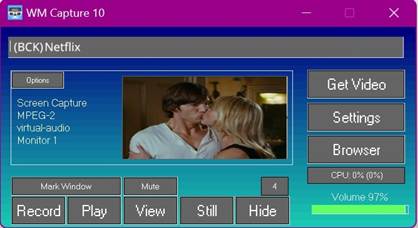
5. Get Video: automatic detection and marking
of the optimum video window size for minimizing CPU loading and increased
recording quality
6. CPU monitor: alerts to CPU overload during
computer idle, playback, or recording
7. Free of charge: WM Capture is available at no
cost, with no ads, no push to buy, and free customer support
More about WM Capture
1. Two clicks recording, plug and play
(Screen Capture mode)
2. Record streaming movies from Netflix, Amazon
Prime, Hulu, video clips, video games, webinars, Zoom, Skype, Chats, Power
Point, web camera, DVD's, any other video you can't otherwise capture
3. Supports Google Chrome Canary browser, record
streaming movies without disabling browser video acceleration
(Windows 10, 8, 7)
4. Supports Windows Game Bar game recording app, adds
multiple features not available on the Microsoft software
5. Record audio played in your computer from any kind
of audio sources
6. Add annotations or verbal comments when recording
webinars, meetings, or chats
7. Monitoring and displaying CPU usage to alert
overloading
Performance
characteristics
·
HD and UHD/4k recording
·
H264, MP4, MPEG-2, AVI, WMV, WMV Screen video
formats
·
Intel Quick Sync, NVIDIA NVENC
·
AAC / MP3 / WMA, WMV audio formats
·
CPU monitoring
·
Video/audio converter and simple
editor included (WM Converter Pro)
Learn more about
WM Capture 10
(all WM Capture 10 versions prior to 10v12)
|